top of page

Paragon Connect has been updated with the ability to add multiple customized Spreadsheet views, a Requested Showing section and a new Hotsheet Alerts Widget.


Multiple Spreadsheets


How It Works:

  1. Open a class-based search as you normally would by click on the view switcher icon.  

  2. Look for the new copy icon next to your spreadsheet name.

  3. Click the copy icon to duplicate your current spreadsheet layout.

  4. Give your new spreadsheet a custom name in the dialog that appears—something that helps you quickly identify its purpose.

  5. Once saved, you’ll have a new spreadsheet with the same fields, layout, and customizations as the original.

  6. Customize this new spreadsheet however you’d like—change fields, rearrange columns, or adjust the layout to fit your specific needs.

  7. If you no longer need a spreadsheet, you can delete it at any time to keep things organized.  Note: At least one spreadsheet must always be available. If only one exists, it cannot be deleted.          


Requested Showings Section
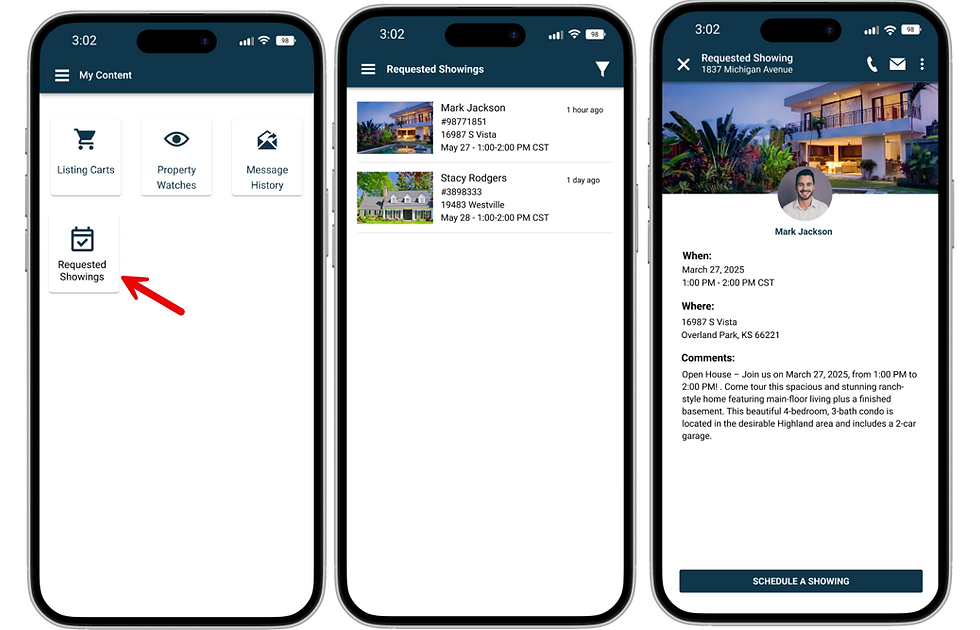
It's been made easier than ever to stay on top of showing requests from your buyers in the Paragon Connect application.

Previously, when a buyer clicked “Request a Showing,” an email was sent to their agent—but that was the only place the request lived. There were no system alerts or central place to track upcoming requests. That changes now.

With this update, multiple new ways to manage and track showing requests have been added:


New “Requested Showings” Section

A dedicated area in the My Content menu now displays all upcoming showing requests. Use built-in filters to narrow by date and quickly find specific request windows.


Contact-Level Visibility

Showing requests now appear on the contact detail page, allowing you to see requests


Hotsheet Alerts Widget

There is now a Hotsheet Alerts widget on your Paragon Connect dashboard. This feature brings you quick access to your saved alerts every time you log in—offering a familiar market monitor experience with even greater control over your search criteria, all without leaving your home screen.


The widget displays your saved Hotsheet searches in a scrollable list. Each alert shows:


  • The number of new matches since your last run (click to view listings)

  • An “All” button to view all results for that Hotsheet

  • The Hotsheet name and last run date (click the name to open the search form with prefilled criteria)


At the top of the widget, you’ll find:

  • A Refresh button to update alert counts

  • An Overflow Menu with: 

    • Manage Hotsheets – opens the full Hotsheet manager

    • Create New Hotsheet – opens a blank Hotsheet search form

    • Default Sort – lets you choose how alerts are ordered:

    • By activity (default)

      • By name (A–Z)

      • Your choice is saved for future sessions


Other helpful features include:

  • Expand/Collapse toggle to view 4–5 alerts or up to 8

  • "View All” link if you have more than 8 alerts, taking you to your full Hotsheet management page

  • A timestamp showing the last time the widget was refreshed


Grab your favorite drink and hop on Zoom as we dive into the growing world of AI and how it’s making it's way in real estate.


From content creation to daily workflows, we’ll share our favorite AI tools, time saving tips, and real-life ways our staff is using it behind the scenes. 


We also want to hear from you too! Come ready to share your own AI wins, tricks, and tools with fellow members and affiliates. 


See you on Zoom!


A recent alert from the National Association of REALTORS® (NAR) highlights a scam targeting real estate pros, leading to significant financial losses for some.

What’s the Scam?

According to NAR’s “Window to the Law” video (View Here), this scam involves fraudsters posing as trustworthy contacts to build rapport over time. They then pitch cryptocurrency investments, often with promises of high returns or urgent opportunities. The U.S. Secret Service has flagged this as a growing issue in the real estate industry, where busy professionals can be prime targets due to their access to funds and client networks. They may reach out via email, text, or social media, urging you to invest in a crypto platform or send funds to a digital wallet. Once you transfer money, it’s gone—and so are the scammers.


Red Flags to Watch For

Here are some red flags to keep on your radar:


  • Unsolicited Offers: Be wary of unexpected messages about crypto investments, especially from unfamiliar contacts or those claiming to know you.

  • Pressure to Act Fast: Scammers often push for quick decisions, saying you’ll miss out on a “once-in-a-lifetime” deal.

  • Suspicious Links or Platforms: Avoid clicking links or downloading apps from unverified sources, as they may install malware or lead to fake investment sites.

  • Too-Good-to-Be-True Returns: Promises of guaranteed high returns with little risk are a classic scam tactic.


How to Protect Yourself

Here are practical steps to safeguard your business and finances:


  1. Verify Contacts: Always double-check the identity of anyone pitching an investment. Call them using a known number or meet in person if possible.

  2. Secure Your Communications: Use encrypted email or secure platforms for sensitive transactions. Never share financial details over unsecured channels.

  3. Research Before Investing: If you’re considering crypto, work with reputable, regulated platforms and consult a financial advisor.

  4. Report Suspicious Activity: If you suspect a scam, report it immediately to the FBI’s Internet Crime Complaint Center (www.ic3.gov) or your local law enforcement.


Why This Matters for You

Real estate professionals are particularly vulnerable because scammers know you handle large transactions and may have access to client funds. Falling for a scam could not only cost you money but also damage your reputation and client trust. By staying informed, you’re taking a proactive step to protect your livelihood.


Stay Vigilant

Scams evolve quickly, so make it a habit to stay updated on the latest threats. Review your cybersecurity practices regularly, and consider reaching out to our team for additional resources or training on fraud prevention. Have you encountered a suspicious message or offer? Share your experience with us so we can keep your WVMLS community informed.

©2026 by Willamette Valley Multiple Listing Services. Support: (503) 399 -8657

bottom of page